


Less manual work, more time running your event
Entryvent brings all your event tools together in one place, helping you plan, sell and analyze with zero chaos.
01
CREATE & MANAGE
Your event is live and selling in minutes, not days.
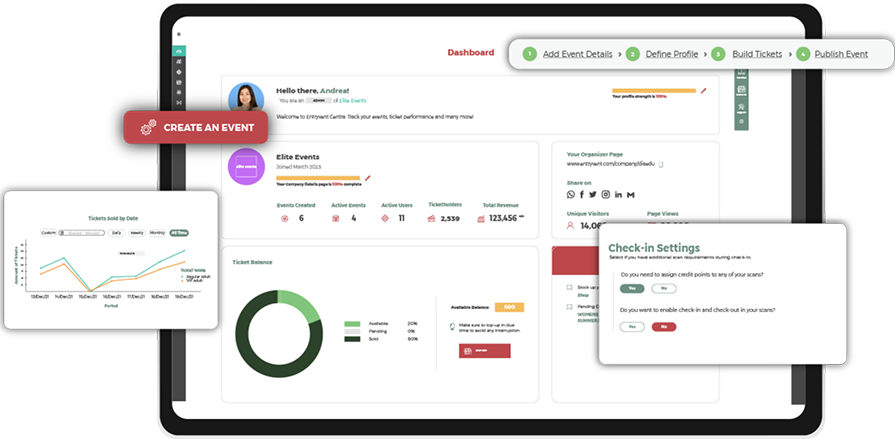
Your event starts here. Everything you need to create, configure and launch is ready from the moment you sign up.
Everything in one platform
Create your event, set up tickets, customize your forms and manage your attendees and payouts, all in one place. Entryvent handles the setup, confirmations and tracking, so you can focus on the experience, not the admin.
Included in every account
Unlimited Events
Public Event Marketplace
Branded Event Page
Multiple ticket types & custom forms
Create tickets in seconds, free, paid, VIP, early bird, each with its own price, capacity and registration form. Collect exactly the data you need using text fields, dropdowns, checkboxes and more.
Attendee visibility & management
See every attendee, what they bought and their full registration details in real time. Edit profiles, resend tickets and booking confirmations, download tickets and manage each attendee directly from your attendee list.
Branded pages, widget and confirmations
Create a branded event page or embed the Entryvent ticketing widget directly on your own website. Branded, customized ticket confirmation emails are sent automatically to every attendee on registration.
Payout management
Track your revenue and manage payouts directly from your account. Full visibility of every transaction, every ticket sold and every amount owed, all in one place.
View all features54 features
Event Setup24
Modify Event
Make instant changes to your event details when necessary.
Publish Event
Activate your event and control who can access it through your privacy settings.
Upload Event Media
Upload images, videos and supporting documents to your event page to create a rich and branded event presence.
Interactive Location Map
Pin your venue on an interactive map for easy direction.
Event Terms and Conditions
Add custom terms and conditions to each event so attendees are informed and agree at the point of registration.
Event Type and Category
Classify your event by type and category to help attendees find it on the marketplace and ensure it reaches the right audience.
Event Nature
Specify whether your event is Physical, Virtual or Hybrid so attendees know how to attend and the platform configures accordingly.
Set Event Capacity
Define the maximum number of attendees for your event. Ticket sales will not exceed this limit, keeping your event within venue and compliance requirements.
Event Duration
Set the full duration of your event including multi-day configurations, session times and timezone settings.
Privacy, Payment Terms and Refund Policy
Set the visibility of each event independently as public, unlisted or private. Define your own payment terms and refund policy per event.
Manage Organiser Page
Customise the content and layout of your organiser listing page on the marketplace.
Edit Organiser Profile
Update your organiser profile with personal or company details as needed.
Set Custom Marketplace URL
Company accounts can define a custom profile URL on the marketplace, e.g. tickets.entryvent.com/yourcompany.
VAT Registration
Company accounts can register for VAT and include company tax details for regulatory compliance.
Invited Events
Users can see all events they have been invited to manage and the specific role and responsibilities assigned to them for each event.
Upload Company Listing Banner
Add a branded banner image to your company profile page on the marketplace.
Upload Company Logo
Add your company logo to your organiser profile and marketplace listing page.
Download Company Listing QR Code
Download a QR code linking directly to your company listing page for easy sharing and print use.
Preview Event Listing Page
Preview how your company listing page appears on the marketplace before publishing.
Track Event Status
Monitor every event across six statuses, Listed, Draft, In Review, Rejected, Active and Ended, from one centralised view.
Toggle Event Listing
Turn your event listing on or off on the marketplace with a single toggle per event.
Set Default Event on Login
Choose which event loads by default when you log in, saving time when managing multiple events.
Set Event Abbreviation
Assign a short code or abbreviation to each event for quick identification across the platform.
Delete Event
Permanently delete an event and all associated data from your account.
Registration & Profiles6
Create Attendee Types
Define the attendee types for your event, such as delegate, speaker, exhibitor or VIP, each with its own registration requirements.
Build the Field Library
Create a reusable library of registration fields once, then add them to any attendee type without rebuilding forms each time.
Reusable Registration Profile
Build your registration profile once and reuse it across every ticket in your event, keeping data capture consistent throughout.
Conditional Logic
Show or hide fields based on earlier answers using parent and dependent fields, so attendees only see what is relevant to them.
Set Mandatory Fields
Mark any field as required so you always collect the information you need before a registration can be completed.
Capture Custom Registration Fields
Add unlimited custom fields to capture exactly the data your event needs, from dietary requirements to company size.
Ticket Setup7
Create Unlimited Ticket Types
Set up as many ticket types as your event needs, from early bird and general admission to VIP and group tickets.
Set Price and Quantity
Define the price and available quantity for each ticket type to control your inventory and revenue.
Link Attendee Type to Ticket
Connect each ticket to an attendee type so the right registration profile is collected at the point of purchase.
Set Ticket Validity and Sales Window
Control when each ticket goes on sale and when sales close, so the right tickets are available at the right time.
Set Sales Channels
Choose which channels each ticket is available through, including online, onsite and imported registrations.
Create Discount Codes
Set up discount codes to offer reduced pricing for early registrations, partners or promotional campaigns.
Timeslot Allocation and PricingComing soon
Allocate capacity and set pricing across specific time slots, ideal for tours, attractions and sessions with timed entry.
Payment and Payouts10
Integrate Payment Service Providers
Choose between the Entryvent payment gateway or your own. This is set once at account level and applies universally across all events you create.
Select Payment Currency
Select the currency you sell tickets in. This is set once at account level and applies to all events. It cannot be changed per event.
Determine Handling Fee Responsibility
Decide whether you or the attendees will cover the payment processing fees.
Enable Multiple Payment Methods
Offer multiple payment options including Visa, MasterCard, Apple Pay and Google Pay.
Enable Credit Card Saving
Allow attendees to save their credit card details for quicker future transactions.
Collect Ticket Sales Proceeds
Collect and receive payments from ticket sales directly in your account.
Send Purchase Invoices
Automatically send detailed invoices to attendees after ticket purchases.
Resend Tickets
Resend a ticket and its QR code to any attendee directly from their order, useful when an email is missed or an address changes.
Manage Sales Orders
Track and manage attendee orders to maintain a clear record of transactions.
Manage Payout Schedule
Set up payout schedules and bank transfer details for smooth fund transfers.
Shop4
Buy Ticket Credits
Purchase ticket credits at the account level. Credits are used across all events you create. The more you buy, the lower the cost per ticket.
Purchase Onsite Solutions
Buy event-level onsite packages per event capacity: Registration, Scan, or the Package Deal covering both.
Purchase Lead Retrieval
Add Lead Retrieval to any event as a supplementary feature for exhibitors and sponsors to capture and manage leads onsite.
Client Dashboard
Automatically provided free when you publish an event. Gives stakeholders and clients a live view of key event metrics via the EV DASH app.
Finance3
View Account Finance
Gain a complete overview of your revenue across all events at a company level.
View Event Sales
Access a detailed breakdown of your earnings from a specific event.
Set Up Accountant View
Provide a tailored interface for accountant users to easily manage ticket sales.
02
OPERATIONS
Collaboration, automation and connected workflows.
Everything that keeps your team, tools and data working together, across every event, every role and every integration.
Team, user & sponsor management
Three levels of access in one platform. Assign internal team members with role-based permissions, add external onsite users who access only the onsite app on event day, and give sponsors or exhibitors their own management layer.
Internal users — role-based platform access
External onsite users — onsite app access only
Sponsor users — manage their own attendees and assign team access to the lead scan app
Secure payments
Use the Entryvent payment gateway straight out of the box. Accept payments instantly with built-in checkout and auto-confirmation. Zero commission on ticket revenue.
API & integrations
Connect Entryvent with your payment gateway and receive funding instantly. We are constantly on the lookout for integrations with other platforms, helping to keep your event data connected across the tools you already use.
Automated messaging
The platform sends confirmations, reminders and updates automatically. From purchase confirmation to payment follow-ups, abandoned cart nudges and invitation reminders for users who have not yet accepted, everything is handled without manual intervention.
Multi-event management
Run multiple events from one dashboard. Switch between events instantly, with each event fully separated and independently managed.
View all features30 features
Users and Roles10
Create Unlimited Users
Set up internal users, external onsite users and sponsor users with different access levels.
Assign Events
Allocate designated events to team members for streamlined management.
Define Event Roles
Establish specific event roles such as project manager, editor, etc.
Modify Users and Event Roles
Edit, delete, block, or search for users and their assigned event roles.
View Permissions
See which events and platform features each team member has access to.
Receive Email Alerts
Manage invitations and acceptance communication via email notifications.
Track User Status
Monitor the status of every user, Activated, Not activated, Blocked or Deleted, from one centralised view.
Resend Activation Invite
Resend the activation invitation email to any user who has not yet accepted and activated their account.
Hierarchical User Assignment
Users can only assign others at or below their own permission level, ensuring access control stays within the organisational hierarchy.
Social Login
Users can sign in with Google or Facebook, making it easy for temporary users such as onsite staff to access the platform quickly without a separate password.
Tourism Compliance5
Create DTCM-Compliant Events
Create events that meet DTCM regulations for gatherings based in Dubai.
Sync Registrations with DTCM
Automatically sync attendee data with the DTCM servers for efficient tracking.
Email DTCM-Integrated Tickets
Schedule ticket emails, including DTCM codes, for all registered attendees.
Assign DTCM Codes for Onsite Registrations
Register new attendees at the door and assign DTCM codes on the spot.
Print Attendee Badges with DTCM Codes
Print attendee badges with embedded DTCM codes during check-in.
Automated Messaging & Emails8
Customise Email Templates
Personalise emails using templates such as purchase confirmation, check-in, etc.
Add Event Branding
Elevate your email with bespoke headers, footers and branded content.
Schedule Email Notifications
Automate email templates by scheduling them for specific dates and times.
Configure Attachments
Set up attachment preferences to add ticket PDFs, invoices, or other files.
Integrate E-wallets
Enable e-wallet integration for electronic ticket storage and smooth check-ins.
Choose Pre-Built Sections
Add predefined sections to the email, such as event details, order summary, etc.
Automated Invitation Reminders
Automatically remind invited users who have not yet accepted their invitation.
Abandoned Cart and Payment Follow-up
Automatically follow up with attendees who have a pending payment or an abandoned cart.
Admin Panel5
View All Orders
Available to the account owner only. See every ticket order across all events, paid, unpaid and failed, in one centralised view.
View Order Details
Drill into any order to see full transaction details including payment method, gateway, device type, browser used and reason for failure where applicable.
Download and Resend Invoices
Download or resend the invoice for any order directly from the Admin Panel.
Events Directory
A full directory of all events within the account, giving the owner a complete overview across every event they manage.
Shop Purchase History
View all ticket credit and onsite feature purchases made through the shop at the account level.
API & Integrations2
Connect Your Payment Gateway
Connect your own payment gateway and receive funding instantly via API integration.
Tourism Authority API
Regional tourism authority APIs such as DTCM are integrated at this level, with further regional integrations being added as they become available.
03
ONSITE MANAGEMENT
Your event running like clockwork from the moment doors open.
From check-ins to badge printing to access control, Entryvent keeps your event running smoothly so you can stay focused on the attendees, not the process.
QR scan and attendee verification
Three device modes give you full control over how attendees are checked in. Choose the view that fits your event setup.
Attendee view — staff find, verify and check in attendees directly from the attendee list
QR view — attendees present their QR code for instant ticket validation
Self-service view — attendees scan their own QR code and manage their data independently on their device
Badge printing on arrival
Print professional badges on demand and get attendees through the door fast. No pre-printing required, unless you want to take advantage of our bulk printing feature.
Access control and movement tracking
Control who enters, when and where. Validate tickets on scan, restrict access by area or time slot, and track attendee movement throughout the day.
View all features42 features
Onsite Registration & Check-in14
Facilitate Walk-in Registration
Register new attendees at the door based on ticket and attendee type.
Issue Quick Tickets
Distribute tickets without registration forms for events where collecting attendee information is not required.
View Attendee List
View all registered attendees and monitor who has checked in.
Modify Attendee Profile
Update attendee data on registration forms as required.
Scan QR Codes
Streamline the check-in process by scanning QR code tickets for instant ticket validation.
Tailor Check-in View
Three device modes, Attendee view, QR view and Self-service view, to suit every access point.
Allow Profile Verification
Enable attendees to verify and update profiles using a QR code on their own device.
Send Registration/Check-in Emails
Provide registration and check-in confirmation through email.
Control Venue Access
Grant event entry based on attendee type, checkpoints, time slots, etc.
View Order History
View, download, or resend invoices using accountant view.
Upload Banner Ads
Display event banners on the app for enhanced branding opportunities.
Import/Export Onsite Data
Upload or download CSV files by attendee type, check-in status, etc.
Access Onsite Reports
Generate detailed reports on onsite registrations and check-ins.
Scan Overview
A dedicated scan view on the event dashboard showing real-time check-in activity across all access points during your event.
Badge Printing7
Create Badge Types
Set up different badge types to suit each attendee group, with electronic and onsite options.
Customise Badge Template
Design badges for thermal or inkjet printing with event branding.
Select Badge Fields
Specify the fields, such as name, badge ID, etc, for each badge.
Download Badge Template
Retrieve the designed badge templates and send them for printing.
Pre-print Badges
Download and arrange pre-printed badges for registered attendees.
Facilitate Onsite Printing
Select printer and enable badge printing directly at the venue.
Execute Bulk Printing
Print large batches of badges onsite in one go.
Access Control and Movement Tracking11
Create Unlimited Ticket Scans
Enable an unlimited number of scans for various entry needs.
Create Checkpoints
Set up checkpoints throughout the event to manage venue access by area or time slot.
Configure Date and Time
Set specific start and end dates and times for scan activation.
Determine Access Variables
Define variables such as attendee type and ticket type to control access.
Record Credit Points
Track and record credits earned by attendees for educational sessions.
Track Session Attendance
Monitor attendance for each session at checkpoints for targeted insights.
Use Multiple Devices
Support multiple devices for scanning tickets and managing operations.
Scan QR Codes
Efficiently scan QR codes for seamless ticket validation and entrance control.
Upload Banner Ads
Add banners on the app to promote sponsors or highlight event information.
Import/Export Scan Data
Upload or download CSV files by scan name, event date, checkpoints, etc.
View Scan Reports
Access detailed reports on ticket scans and attendee check-ins.
Exhibitors & Sponsors10
Manage Sponsor Companies
Add, edit, or delete sponsor company data as and when needed.
Create Sponsor Users
Customise roles and permissions for sponsor team members and lead scanners.
Add Sponsored Sessions
Easily set up and monitor sessions and assign sponsors to each scan.
Configure Sponsor Settings
Set up data sharing and allocate tickets for importing sponsored attendees.
View Sponsors Report
Access detailed reports on sponsor activities and performance metrics.
Import Sponsored Attendees
Upload registration data for sponsored attendees and monitor attendance.
Manage Leads
View, edit, delete, filter, and sort lead data as needed.
Qualify Leads
Tailor lead forms with interest tags for more effective follow-ups.
View Lead Dashboard
Gain comprehensive insights into lead metrics and team performance.
Sponsor Banner Ads on Apps
Feature prominent logos and branding across registration, scan and lead apps.
04
PROMOTE & MARKET
Get your event in front of the right people.
Create a branded event page, list on the public marketplace and reach your audience with targeted promotions. Everything you need to sell tickets is built in.
Promote and sell more tickets
Create a branded event website. Make your event public and it will automatically appear on our marketplace, putting it in front of our buyers. Your dedicated organizer page brings all your public events together in one place, giving you a permanent space to promote everything you run.
Registration on your own website
Embed the Entryvent registration widget on your own website, keeping your audience within your brand environment. The registration process currently completes on the Entryvent platform; a fully embedded, on-domain registration experience is on our roadmap.
Promo codes & discounts
Create discount codes with custom values, quantities and expiry dates to drive early registrations.
View all features24 features
Event Page16
Create Event Page
Build a professional event page using pre-built templates for quick setup.
Generate Custom URLs
Set up dedicated, shareable custom URLs for easy promotion and access.
Control Privacy Settings
Manage event page visibility: public, private or invite only.
Add Event Branding
Include branded images, videos, and documents to enhance your event page.
Provide Event Details
Input key information like description, date, location, and social media links.
Define Event Format
Specify the type and interest categories of your event to attract the right crowd.
Enable Shopping Cart
Simplify the checkout process with options for tickets, discounts, and payments.
Display Attachments
Showcase important materials like agendas or brochures on your event page.
Integrate Payment Gateway
Enable secure payments with Apple Pay, Google Pay, Visa and MasterCard.
Share Event Page
Easily distribute your event across social media platforms to boost visibility.
Facilitate Group Booking
Offer the choice to send tickets to the registrant or to individual ticket holders.
Enable Contact with Organiser
Allow attendees to contact you for assistance or questions about the event.
Embed Event Widget
Add ticketing widgets to your own website for easy promotion and direct sales.
Track Event Page Performance
Track page views, viewer demographics, etc., to measure performance.
Promote Event on Marketplace
Make your event public and it will automatically appear on our marketplace, putting it in front of our audience.
Display Event on Organiser Page
Your dedicated organiser page lists all your public events in one place under your company name.
Entryvent Marketplace5
Showcase Your Events
Boost your event visibility on the Entryvent marketplace for a wider audience reach.
Highlight Featured Events
Promote high-priority events in prime positions on the listing to draw attention.
Enable Social Sharing
Make it easy for users to share your event page on social media platforms.
Display Organiser Profiles
Your dedicated organiser page showcases all your upcoming and past events in one place.
Control Listing Privacy
Customise who can see your events with flexible privacy settings per event.
Embeddable Widgets3
Event Listing Widget
Embed all your current and future events on your corporate website as a list or calendar view, keeping your audience up to date without leaving your site.
Single Event Widget
Embed a specific event directly on a dedicated page for that event, ideal when you have a standalone event website or landing page.
Customise Widget Appearance
Configure button colour, border, text colour and layout to match your brand before embedding.
05
ANALYTICS & INSIGHTS
Every event smarter than the last.
Turn every event into data you can act on. Real-time dashboards, automated reports and dedicated apps give you the full picture whenever you need it.
Comprehensive event dashboards
Seven dedicated report categories give you a complete picture of your event, updating in real time. Track ticket sales, attendee data, onsite registration, scan activity, engagement, sales performance and sponsor metrics. Use filters and data comparisons to instantly surface the insights that matter most.
Revenue Insights
Attendee Behavior
Engagement
Live attendance tracking
Monitor check-ins in real time across every access point. Know exactly who is in the room at any moment during your event. Over time, attendance patterns reveal what your attendees are most interested in, a valuable source of behavioral insight for future program development.
Attendee data & profiles
Full attendee records including what they bought, their registration data, attendance and payment status. Quickly search and retrieve any attendee by name or email, with full visibility into every interaction and purchase.
Export & reporting
Filter, export and share only the metrics that matter most to you. Export your full attendee and revenue data at any time for reporting.
Download summaries
All collected data is easily downloadable, making it simple to take your insights and use them directly in reports, presentations or stakeholder updates.
View all features18 features
Dashboards6
View Admin Dashboard
Access all your event performances, revenues, and reports in one place.
View Event Dashboard
Get a complete picture of your event in one view, with ticket sales, revenue, attendee data, scan activity and registration channel breakdown, all updating in real time.
Event Summary
Real-time snapshot of your event, with ticket balance, event capacity, tickets sold, checked-in attendees and onsite registrations all visible at a glance.
Attendee Insights
Breakdown of attendees by type and demographics, filterable by the custom registration fields you collected, giving you a clear picture of who attended your event.
Tickets Sold by Registration Channel
See which channels, online, onsite or imported, are driving your ticket sales, broken down by ticket type.
Access on EV DASH
View your headline numbers on the go via the EV DASH mobile app at any time.
Event Reports8
View Tickets Report
Track ticket sales, types, and revenue trends with a detailed ticket report.
View Attendees Report
Analyse attendee data, registrations, and demographics to gauge event turnout.
View Onsite Registration Report
Monitor onsite attendee activity, walk-in registrations, payment channels, etc.
View Scans Report
Track attendee check-ins and credit points for enhanced session tracking.
View Sales Report
Analyse total revenue from tickets and add-ons for a full financial picture.
View Sponsors Report
Evaluate sponsor contributions and engagement to measure the event ROI.
View Engagement Report
Understand how attendees are engaging with your event, sessions and content.
Export Event Reports
Export detailed reports by category, such as tickets and scans, in CSV format.
Sales Revenue & Insights4
Share Client-Focused Reports
Generate tailored reports for clients, offering insights into event performance.
View Real-Time Analytics
Monitor live data, including attendee engagement, for quicker decision-making.
Apply Filters and Comparisons
Use filters and data comparisons to instantly surface the insights that matter most.
Download Summaries
All collected data is easily downloadable, making it simple to use in reports, presentations or stakeholder updates.
RELIABILITY & SUPPORT
Built to run your event. Ready when you need help.
A platform is only as good as the team behind it. Entryvent is built for reliability and backed by a support team that understands events.
Platform uptime
99.9%
With a public status page so you always know what is happening.
Response time
1 hour
Across live chat, email and in-app support.
Event day priority support
On the day of your event, support is prioritized. Our team is on standby so any issue is resolved before it affects your attendees.
Self-service knowledge base
A comprehensive library of guides, tutorials and how-to articles so you can find answers and set up independently at any time.
Data ownership
100% yours
Your attendee data belongs to you. We never share, sell or use it for any purpose outside your account.
Security
100% secure
All data is encrypted in transit and at rest.
GET STARTED
Need help? We are here.
Explore Entryvent to unlock endless possibilities and turn your dream event into a reality.